
1 / 2
Zip combines two requirements on the same grid: visit the numbered cells in order and pass through every cell. A route that connects all the numbers can still be incomplete if it leaves blank squares unused. The challenge is to plan a single continuous path that satisfies both conditions.
Start at 1 and keep space for the rest
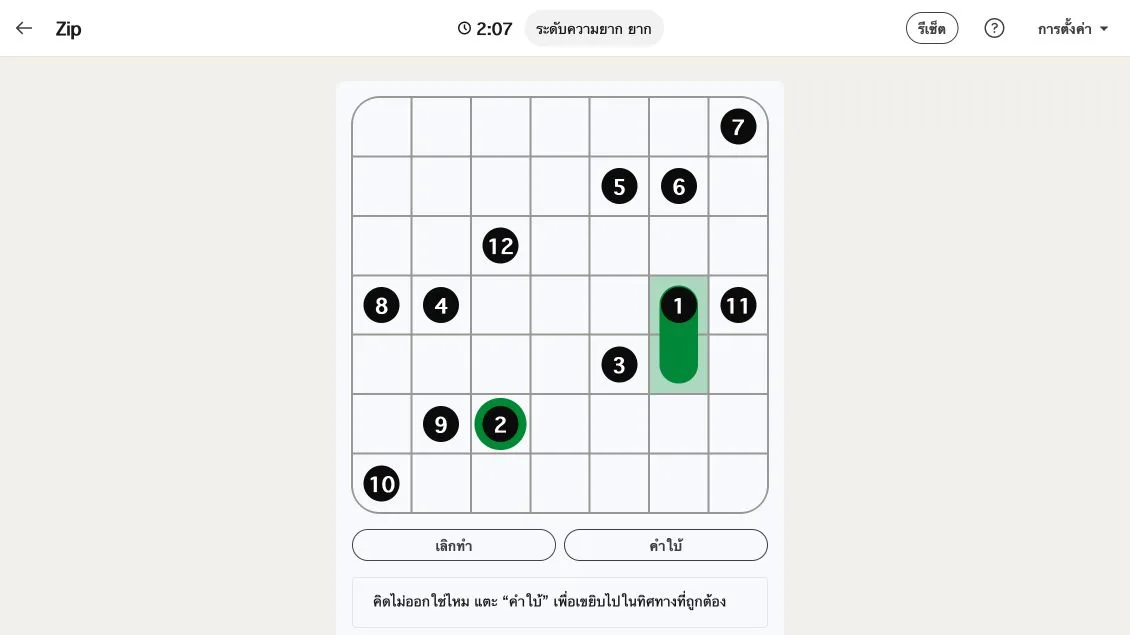
We opened the daily puzzle and started at the cell marked 1. Dragging down into the adjoining cell drew a green path, while 2 remained highlighted as the next numbered target. That immediate feedback makes the sequence visible without providing the complete route.
The tested board was a 7-by-7 grid with numbers extending to 12. That describes the daily board we saw, not a guarantee that every edition uses the same dimensions or number count. Our short path was only the beginning of the solve; we did not finish the board or reveal its solution.
The in-game tutorial explicitly requires visiting all the cells and taking the numbers in order. It is useful to read those as separate checks while considering a route. Reaching the next number quickly may leave an awkward pocket of cells behind. Looking ahead for such pockets is practical planning advice, not a proven optimal solving method.
Correct a route rather than race the timer
The interface provided Undo, Hint and reset controls, with a timer above the grid. The tutorial recommends a hint if you are stuck. We inspected those controls but did not request a hint or test the scoring consequences of using one. The timer shown in our screenshot includes interface inspection and should not be read as a solve time.
The official page rendered in Thai in our browser. Its tutorial and the numbered grid still made the two core rules clear; We tested mouse input on desktop. Keyboard movement and mobile gestures were not established by this session.
FAQ about LinkedIn - Zip
Is connecting all the numbers enough to finish Zip?
No. The in-game tutorial also requires the path to visit every cell in the grid, while taking the numbered cells in order.
Which number should I visit after starting Zip?
Start at 1 and continue in ascending order. In our test, the interface highlighted 2 as the next target after the first path segment.
Can I get help when a Zip route gets stuck?
The tested interface includes a Hint control and Undo. We inspected them but did not test hint penalties or a completed score.
Player reviews
0 reviewsPlayed it? Share what you think and help the next player choose.
Your experience
Games like LinkedIn - Zip
All shapes & patterns games →
LinkedIn - Tango
LogicBalance suns and moons in every row and column while following equality and opposite-symbol links.

LinkedIn - Queens
LogicPlace one crown in each row, column and colored region, keeping all crowns from touching—even diagonally.

Marked
MemoryRemember briefly flashed target positions and replace them on a blank board, with distance feedback and more marks in each daily round.

Cutle
Shapes & PatternsCut a daily shape into two equal areas with one straight drag. Cutle records your first score, offers past shapes, and counts 48:52 or better as a win.

Geocrumble
GeographyRecognize three countries from separated map fragments. Wrong guesses join pieces and reveal more coastline, while continent feedback helps narrow the search and the score drops.

Flipside
Shapes & PatternsFlip two-coloured paper into an all-white target shape, plan the order of neighbouring folds, and solve three daily sheets in as few moves as possible.