
1 / 2
On this page
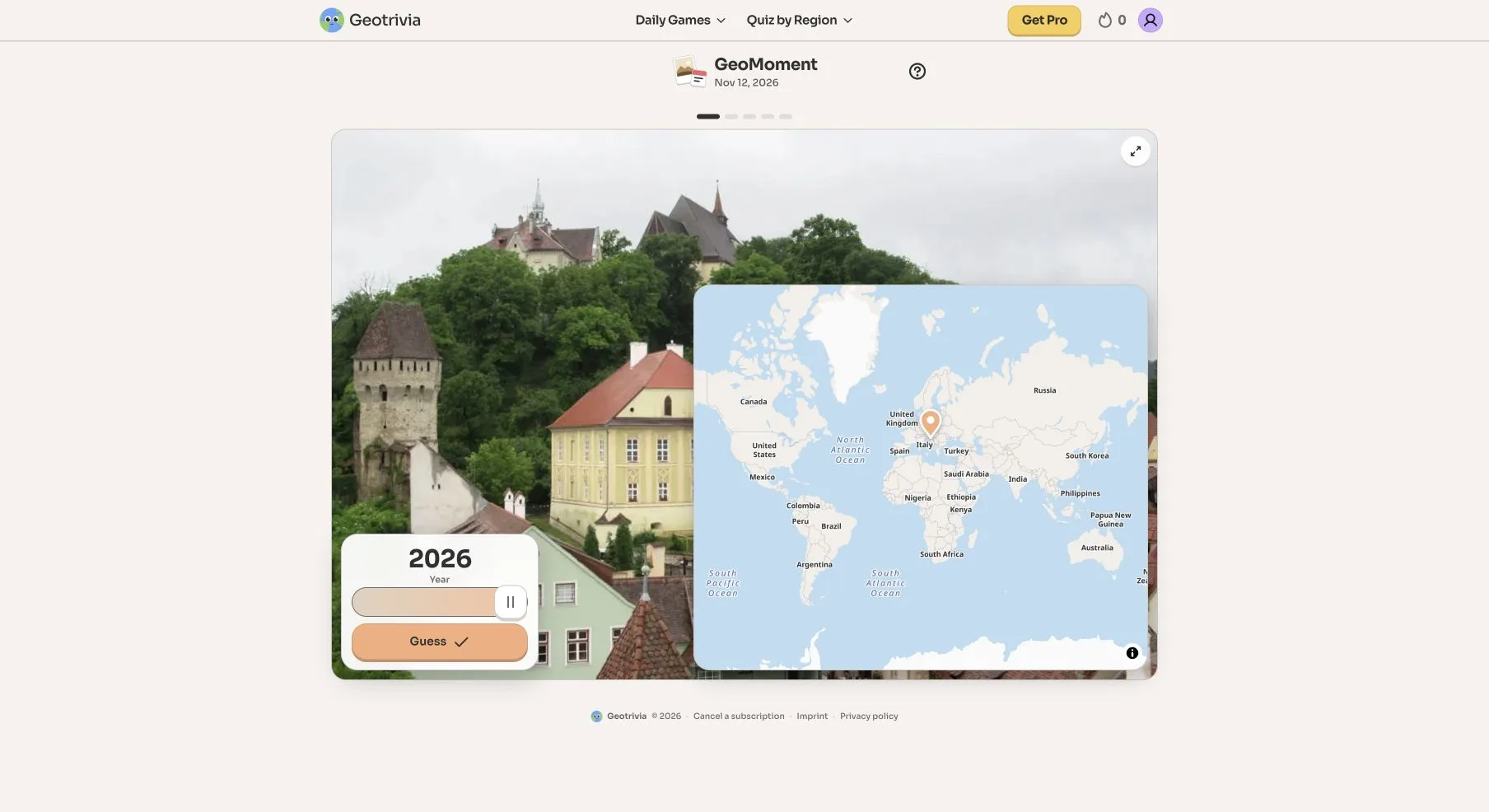
GeoMoment asks for two readings of the same photograph: where it was taken and when. A recognisable building may settle the country without settling the decade. Conversely, the clothes and vehicles can suggest a period while the landscape leaves several possible locations. You submit a map pin and a year together, then see how each part contributed to the score.
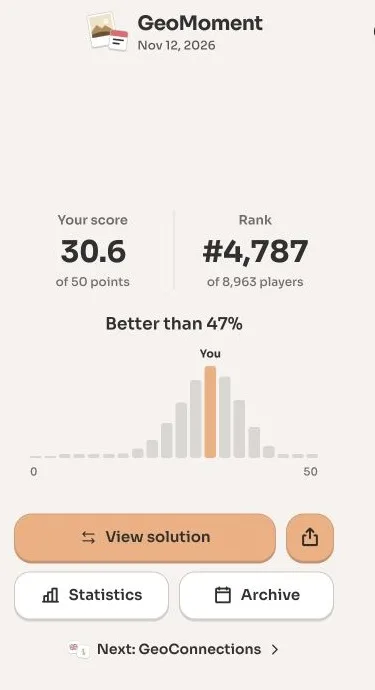
Our completed five-photo daily finished at 30.6 out of 50. Several year estimates were reasonably close while the map guesses remained much further away. That split is useful feedback: a respectable total does not necessarily mean both halves of an estimate were equally strong.
Set the year, then commit a location
The photograph occupies most of the round. The year control uses a slider, and the map starts as a smaller panel that can be opened for pin placement. In our desktop test, the year could be adjusted independently of the map. The Guess button stayed unavailable until a location had been selected; choosing a year alone was insufficient.
Think about those inputs separately before pressing Guess. For the date, look for evidence that could distinguish neighbouring decades: transport, street furniture, clothing, or the condition of a landmark. For the location, consider the building style and surroundings before committing to a familiar-looking country. These are ways to organise an estimate, rather than guarantees that a particular clue identifies the answer.
Map precision deserves attention too. Our broad regional pins sometimes landed much farther from the intended city than the initial mental estimate suggested. Check the actual marker rather than treating a tap somewhere in the right part of the world as a finished location guess. A good year cannot remove the distance error.
Read the two errors after submission
The reveal gives the actual place and year, the number of years away, and the geographic distance. It also shows separate point contributions. In the tested daily, a three-year error earned 4.7 points for time, while a much larger location error earned considerably less for place. That is an observed example, not a complete scoring formula.
Each round has up to 10 points, and the five rounds contribute to a total out of 50. Use the breakdown to decide what needs work. If the date is consistently close, spending longer on a tiny slider adjustment may offer less benefit than checking the region of the map pin. If the location is clear but the period is vague, inspect the people and objects again before submitting.
The answer panel also makes the photograph more than an anonymous quiz image. Our reveals included photo attribution or licence information and a Wikimedia Commons link. Those details appear after committing the guess, so they can support a closer look at the photograph without supplying an outside answer during the attempt.
A result you can review
After the fifth round, the game showed the total score and controls for the solution, sharing, statistics and the archive. The final score is a compact way to compare attempts, but the round breakdown explains much more about how the estimate went wrong. We would use it to separate a mistaken date assumption from an imprecise map selection.
The tested version presented a dated daily set. Our evidence covers one complete desktop session; it does not establish a reset timezone, the full year range, or the exact point-loss curve. The most useful habit from that session is simple: make an explicit decision on both axes before submitting, then read both errors instead of judging the whole guess from the total alone.
FAQ about GeoMoment
Can I submit only a year?
No. In our test, Guess remained unavailable until a map pin was selected, even after the year was adjusted.
Does the score combine time and location accuracy?
Yes. The reveal shows separate year and distance errors with separate point contributions; each round can contribute up to 10 points.
Where can I see the source of a photograph?
The answer reveals we inspected included attribution or licence details and a Wikimedia Commons link after submission.
Player reviews
0 reviewsPlayed it? Share what you think and help the next player choose.
Your experience
Games like GeoMoment
All geography games →
GeoQuest
GeographyLocate the requested countries on a world map in a daily quest or regional practice. Retry mistakes, zoom into small countries and compare first-try accuracy when the round ends.

Flagle.io
GeographyReveal a daily flag tile by tile and combine its colours with distance, direction and proximity clues within six guesses.

Flagle
GeographyIdentify a flag through matching pixels, overlap percentages and six country guesses in the flagle-game.com version.

Worldle
GeographyRead a country or territory outline, then combine distance, direction and proximity across six geographical guesses.
pinfact
GeographyPin locations that fit five daily facts in pinfact, balancing map accuracy with bonuses for less common answers.
Far-Fetched
GeographyJudge seven unusual headlines as real or fake in Far-Fetched, then pin where the true stories happened.