
1 / 2
VideoOn this page
Five separate alphabet searches run across every Word Peaks row. You have six attempts to find a five-letter word, but each tile tells you whether that position needs an earlier letter, a later letter or the letter you already chose. A wrong guess can therefore narrow all five positions at once.
The puzzle, made by vegeta897, keeps the familiar five-column layout while changing what you do with the feedback. Letter frequency alone is not enough. You need words whose individual letters make useful tests within the ranges you have already established.
Translate the colors into directions
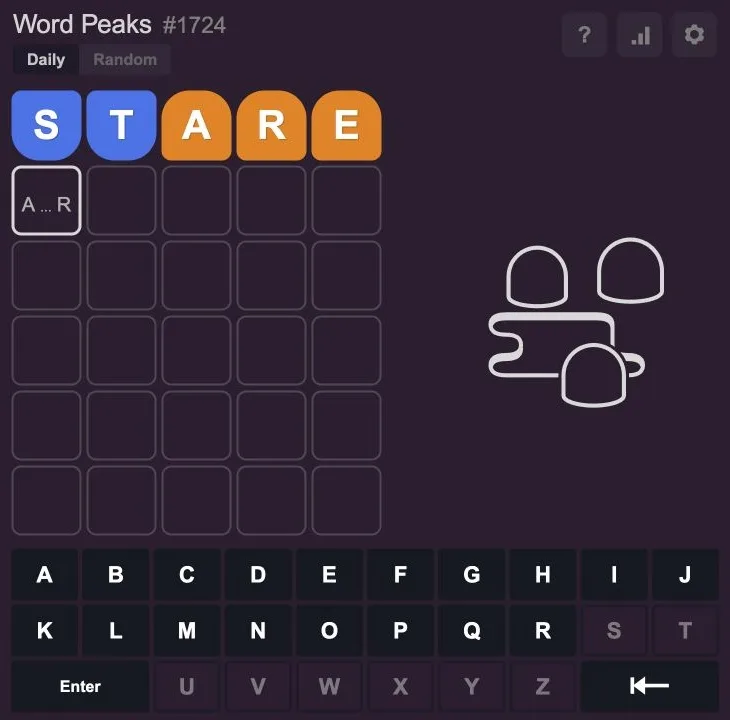
In the standard colors we tested, green means an exact letter in the correct position. Orange means your guessed letter is too early in the alphabet, so the answer's letter comes later. Blue means your letter is too late, so you need something earlier. These clues apply to the corresponding column, not to the word as a whole.
Read the displayed range when a color leaves you uncertain. After our opening guess, the active first-position tile showed A–R. That was a concrete boundary to work with, rather than a vague instruction to choose a different letter. The keyboard also updated which letters were dimmed as we moved through positions while typing.
An early mistake in our test came from reading a direction incorrectly. Checking the literal range corrected it before we settled on the next word. This is a worthwhile habit: translating “blue” into “earlier than this letter” is more reliable than trying to remember the color without its meaning.
Build a word from compatible ranges
Each new row is a chance to improve several columns, but the letters still have to form a word. One position may be tightly constrained while another remains broad. Start with what you know, then look for a candidate that gives useful information in the uncertain positions as well.
A green tile provides an anchor. In our round, finding a confirmed letter helped organize the next guesses, but it did not solve the neighboring columns. Later, typing a partial candidate exposed a B–N range at the next position. That live reminder was particularly useful near the end, when choosing a word that ignored an earlier boundary would waste a scarce attempt.
We finished daily puzzle #1724 on the sixth and final guess, with the game reporting 3:11. The last row made the six-attempt limit feel meaningful: the alphabet clues gave considerable information, yet fitting all of it into one recognizable word still required care. Our completed round used the standard mode; we did not test a Hard mode win.
Settings that help you read the board
The options include High contrast, Hard mode, a setting to show all hints in a row and an OpenDyslexic font option. Our default view showed the hint for the active position. If you prefer to inspect several ranges together, the all-hints option is worth checking. These settings were visible in the menu; our recorded result does not measure their effect on difficulty or reading speed.
Daily and Random selectors are available on the official Word Peaks page. We played Daily and left Random untested. The page also links its open-source project, so the creator's own site is a clear starting point for the browser version.
FAQ about Word Peaks
What do blue and orange mean in Word Peaks?
In the standard colors, blue means your letter is too late in the alphabet and orange means it is too early. Green is an exact positional match.
Are Word Peaks clues about the whole word?
No. Each column compares the guessed letter with the answer’s letter in that same position.
How can I check a letter’s remaining range?
The active tile displays an alphabet range, and the keyboard updates while you enter the next word. Options also include showing all hints in a row.
Is there a Random mode in Word Peaks?
Yes, a Random selector is visible beside Daily on the official page. Our recorded playthrough used Daily, so Random was not tested.
Player reviews
0 reviewsPlayed it? Share what you think and help the next player choose.
Your experience
Games like Word Peaks
All word games →
Letter Tax
WordAnswer seven categories while permanently taxing letters out of later words, then weigh rescue help against leaderboard eligibility.

Decoys
WordChange one letter in every word to uncover a shared secret group. Decoys separates harmless typos from real-word slips and marks solves that use its single reveal.

sedecordle
WordSolve sixteen five-letter words with a shared stream of guesses and a 21-guess limit in the original Sedecordle mode.

Transfiguword
WordSolve three definition clues, bank their letters, then rearrange the full pool into two new answers and a mystery word.

Wordgy
WordJoin a chain of compound words and two-word phrases, with free direction changes and optional score-reducing help.

Wordsummit
WordTrace adjacent letters to find the highest-scoring word on a 5×5 board. Five attempts, tile multipliers and coloured feedback make each path a deduction.